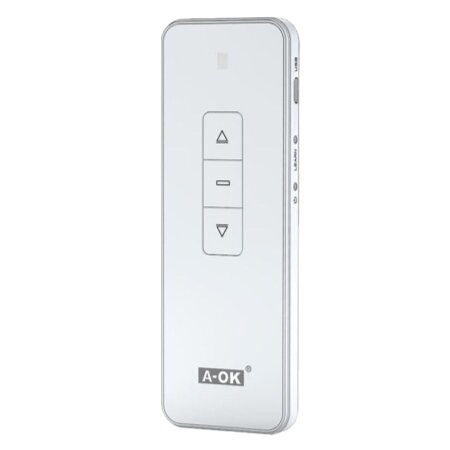
Experience ultimate efficiency and convenience in controlling your blinds and other devices with the A-OK Series USB Deluxe 16-Channel Remote Control . This advanced controller offers comprehensive management of your devices from anywhere in your home or office, combining cutting-edge technology with an ergonomic and user-friendly design.
This device has been designed to deliver exceptional performance and unmatched reliability. Explore the features that make it stand out in the market.
The remote operates at a frequency of 433.92 MHz , ensuring stable and interference-free transmission, allowing you to control your devices regardless of common physical barriers in home and business environments.
With 16 available channels , this remote allows individual management of up to 16 different devices, offering unprecedented flexibility to customize and expand your home automation system.
This remote control is compatible with a wide range of devices that use RF signals, including blinds, lights, and alarm systems , making it a comprehensive home automation solution.
Every aspect of the controller has been carefully considered to ensure durability and functionality.
The A-OK remote control is not just a controller, but a smart home management tool. Let’s see how its advanced features can make your daily life easier.
Manage multiple devices simultaneously with a single click. Whether adjusting the lights or closing the blinds, this remote simplifies all your remote control needs.
Schedule automatic tasks such as opening and closing blinds at specific times of day to maximize energy efficiency and improve security in your home.
Customize commands to create specific scenarios or routines, such as turning off all devices when leaving home, offering a level of personalization that transforms your environment.
Setting up your A-OK Series USB Deluxe 16-Channel Remote Control is a simple and straightforward process. Here’s a step-by-step guide to ensure you can start using your remote control smoothly and efficiently.
Press the reset button for 10 seconds; the remote will return to its original state.
Yes, as long as the devices are compatible with the 433.92 MHz frequency.
The remote control has an effective range of up to 200 meters in open field.
Yes, you can configure commands to run on specific days, adapting usage to your weekly routine.
The A-OK Series USB Deluxe 16-Channel Remote Control is your perfect partner for efficient and simplified management of your electronic devices. Offering advanced technology, ease of use, and customization, it will transform the way you interact with your home or workspace. Make your daily life more convenient and secure with this exceptional device.
Choosing the right motor for your blinds is crucial for optimizing the functionality and efficiency of your home or business. In this post, we’ll help you understand the different types of motors, their features, and how to select the most suitable one based on the type of blinds, their weight, and your preferred activation system. […]
javier18 April 2024
Choosing the right motor for your sliding gate is essential for ensuring efficient and safe operation. A suitable motor improves convenience and accessibility while extending the life of your gate. In this guide, you’ll discover the essential factors to consider, from power to safety features, to find the ideal motor that meets your specific needs. […]
javier25 April 2024

Have you wondered if you can motorize your manual awning? The answer is yes! Imagine being able to control your awning with the touch of a button or even from your mobile phone. Motorizing a manual awning not only improves convenience but also extends its lifespan and offers energy efficiency. In this guide, you’ll discover […]
javier20 June 2024
Lorem ipsum dolor sit amet, consectetur adipiscing elit. Ut ac lorem sed felis porta mollis id nec massa. Phasellus nec efficitur sapien. Morbi orci neque, placerat ac tellus quis, pretium varius ex. Aliquam rhoncus lobortis gravida. Proin accumsan quam eget volutpat consectetur. Nam a neque et ante sodales feugiat. Aliquam dapibus sed neque vitae ullamcorper. Aliquam erat volutpat. Aliquam nec pellentesque sapien. Nullam a blandit est, in facilisis ante. Pellentesque venenatis vitae leo vulputate malesuada. Maecenas posuere enim metus, vel elementum tellus convallis sit amet. Mauris lobortis neque eget diam congue, id elementum magna feugiat. Etiam semper id elit et commodo. Curabitur sit amet ligula massa.
Lorem ipsum dolor sit amet, consectetur adipiscing elit, sed do eiusmod tempor incididunt ut,labore et dolore magna aliqua. Ut enim ad minim veniam,