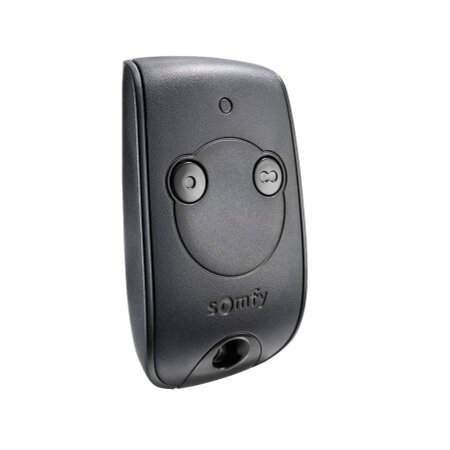
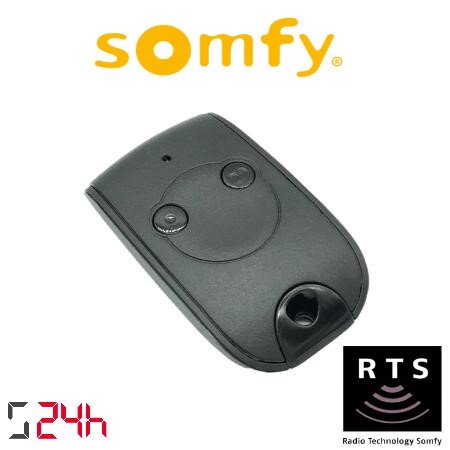
The KEYTIS NS 2 RTS remote control is an essential tool for easily controlling your automatic blinds and doors. With advanced technology and an ergonomic design, this remote offers convenience and security in a single device. Below, we present everything you need to know about its features, specifications, benefits, and how to program it.
Key Features
The KEYTIS NS 2 RTS controller stands out for its many features that make it unique on the market. Let’s take a look at the main ones:
Compact and lightweight design : Easy to carry and handle.
Radio frequency 433.42 MHz : Secure and interference-free communication.
Two buttons : Allows you to control up to two different devices.
LED indicator : Indicates operation and battery status.
RTS Compatibility : Compatible with a wide range of RTS motors and receivers.
Technical specifications
This controller offers technical specifications designed to meet the most demanding needs. Here are the details:
Dimensions : 63 x 36 x 10 mm
Weight : 16 g
Power supply : CR2430 lithium battery
Transmission range : Up to 200 meters in open field
Operating temperature : -20°C to +60°C
Protection : IP30 rating for indoor use
Benefits of the KEYTIS NS 2 RTS controller
Using the KEYTIS NS 2 RTS controller offers numerous benefits that enhance the user experience. Among the most notable are:
Ease of use : Control your devices with just the touch of a button.
Increased security : Secure radio frequency technology that prevents unauthorized access.
Durability : High-quality materials that ensure a long lifespan.
Universal compatibility : Works with a wide variety of RTS products.
Low energy consumption : Extends battery life.
Step-by-step guide to programming the remote control
Programming the KEYTIS NS 2 RTS remote control is a simple process that you can complete in just a few minutes. Follow these detailed steps to configure it correctly:
Step 1: Prepare the remote control : Make sure the remote control battery is properly installed and has sufficient charge. Keep the remote control near the motor or receiver you wish to program.
Step 2: Activate programming mode on the receiver : Locate the programming button on the RTS motor or receiver. This button is usually hidden behind a safety cover. Press and hold it until the motor’s LED indicator flashes, indicating that it is in programming mode.
Step 3: Synchronize the remote : While the motor is in programming mode, press the button on the KEYTIS NS 2 RTS remote you wish to program. Keep the button pressed until the motor responds, which may be indicated by movement or a sound.
Step 4: Confirm programming : Release the button on the remote and verify that the programming was successful by testing the remote to open or close the blind or door. If the device responds appropriately, the programming was successful.
Step 5: Finish programming : If you need to program more remotes, repeat the previous steps for each one. Once programming is complete, make sure to exit programming mode on the motor or receiver. This can be done by pressing the programming button again or by waiting for the motor to exit programming mode automatically.
Step 6: Final Test : Test all programmed buttons to ensure that each one controls the corresponding device without problems.
Frequently Asked Questions
How can I tell if my remote control is programmed correctly?
To check if the KEYTIS NS 2 RTS remote control is programmed correctly, press the programmed button and observe if the blind or door responds. If the device moves, the programming was successful. If not, review the programming process and repeat it if necessary.
Can I program the remote to control multiple devices?
Yes, the KEYTIS NS 2 RTS remote can control up to two different devices thanks to its two buttons. Each button can be programmed for a different device following the same programming process.
What is the range of the KEYTIS NS 2 RTS remote control?
The KEYTIS NS 2 RTS remote control has a transmission range of up to 200 meters in open areas. However, this range may be reduced indoors due to obstacles such as walls and other electronic devices.
What to do if the LED indicator does not light up?
If the remote’s LED indicator does not light up, check that the battery is installed correctly and charged. If the battery is in good condition and the problem persists, try resetting the remote by removing and reinserting the battery. If the LED still does not light up, you may need to contact technical support.
The KEYTIS NS 2 RTS remote control is an efficient and secure solution for controlling your automatic blinds and doors. With its advanced features, technical specifications, and numerous benefits, this remote control is an essential tool for any home or business. Its easy programming and maintenance ensure a hassle-free user experience.
Technical Specifications for KEYTIS ns 2 RTS Controller
Choosing the right motor for your blinds is crucial for optimizing the functionality and efficiency of your home or business. In this post, we’ll help you understand the different types of motors, their features, and how to select the most suitable one based on the type of blinds, their weight, and your preferred activation system. […]
Choosing the right motor for your blinds can be an overwhelming task if you aren’t familiar with the available options. Are you wondering how much power is needed to lift your blinds or which type of control is most convenient? Blind motors not only make life easier but also enhance home security and comfort. In […]
Can you imagine controlling your blinds from your mobile phone or programming them to adjust automatically depending on the time of day? Automating your blinds turns that idea into a practical reality, improving not only the comfort of your home, but also its energy efficiency and security. This article shows you everything you need to […]
javier12 November 2024
Subscribe now!
Lorem ipsum dolor sit amet, consectetur adipiscing elit. Ut ac lorem sed felis porta mollis id nec massa. Phasellus nec efficitur sapien. Morbi orci neque, placerat ac tellus quis, pretium varius ex. Aliquam rhoncus lobortis gravida. Proin accumsan quam eget volutpat consectetur. Nam a neque et ante sodales feugiat. Aliquam dapibus sed neque vitae ullamcorper. Aliquam erat volutpat. Aliquam nec pellentesque sapien. Nullam a blandit est, in facilisis ante. Pellentesque venenatis vitae leo vulputate malesuada. Maecenas posuere enim metus, vel elementum tellus convallis sit amet. Mauris lobortis neque eget diam congue, id elementum magna feugiat. Etiam semper id elit et commodo. Curabitur sit amet ligula massa.
Newsletter
Lorem ipsum dolor sit amet, consectetur adipiscing elit, sed do eiusmod tempor incididunt ut,labore et dolore magna aliqua. Ut enim ad minim veniam,